

SecureCloud log
  • Features
    • Features

    • SecureCloud

      Data exchange and collaboration made easy in business cloud storage with maximum data protection!

      Certifications & Attestations

      Independently audited: ISO 27001, BSI C5, Trusted Cloud, CIS and GDPR. All certificates and attestations at a glance.

      Compliance

      Meet regulatory requirements such as GDPR, NIS2, DORA and KRITIS with confidence, using a sovereign cloud.

    • SecureShare Megamenu
      SecureShare

      Share files and folders: fully encrypted and secure!

      SecureWork Megamenu
      SecureWork

      Collaborate productively and simultaneously.

      SecureSign Megamenu
      SecureSign

      Legally compliant digital signatures

  • Solutions
    • Solutions

    • Industries

      SecureCloud is the ideal solution any industry

      Legal & Tax
      Law, Auditors & Tax Consultants
      HealthCare-1
      Healthcare
      Government (1)
      Government
      Financial sector
      Financial sector
      Manufacturing
      Manufacturing industry
    • Divisions

      SecureCloud is the productive solution for this and other departments!

      marketing
      Marketing
      IT
      IT
      HR
      HR
      Sales
      Sales
    • Use Cases

      How to use SecureCloud productively in everyday work!

      Secure data exchange
      Secure data exchange
      sicherer-cloud-speicher
      Secure Cloud Storage
      efss
      Enterprise File Sync & Share
      advanced-access-management
      Advanced Access Management
      MCP Server
      MCP Server
  • Pricing
  • About SecureCloud
    • About SecureCloud

    • Company

      Get to know SecureCloud: company, contact, client download and support.

      About us-1
      About us
      Contact-1
      Contact
      Download-1
      Download
      Help & Support-1
      Help & Support
    • Resources

      Knowledge around the secure cloud: blog, whitepapers, webinars and glossary.

      Blog
      Blog
      Whitepaper
      Whitepaper
      Webinars
      Webinars
      Glossary
      Glossary
Free trial
    • English
    • German
    • Features
      • Features

      • SecureCloud

        Data exchange and collaboration made easy in business cloud storage with maximum data protection!

        Certifications & Attestations

        Independently audited: ISO 27001, BSI C5, Trusted Cloud, CIS and GDPR. All certificates and attestations at a glance.

        Compliance

        Meet regulatory requirements such as GDPR, NIS2, DORA and KRITIS with confidence, using a sovereign cloud.

      • SecureShare Megamenu
        SecureShare

        Share files and folders: fully encrypted and secure!

        SecureWork Megamenu
        SecureWork

        Collaborate productively and simultaneously.

        SecureSign Megamenu
        SecureSign

        Legally compliant digital signatures

    • Solutions
      • Solutions

      • Industries

        SecureCloud is the ideal solution any industry

        Legal & Tax
        Law, Auditors & Tax Consultants
        HealthCare-1
        Healthcare
        Government (1)
        Government
        Financial sector
        Financial sector
        Manufacturing
        Manufacturing industry
      • Divisions

        SecureCloud is the productive solution for this and other departments!

        marketing
        Marketing
        IT
        IT
        HR
        HR
        Sales
        Sales
      • Use Cases

        How to use SecureCloud productively in everyday work!

        Secure data exchange
        Secure data exchange
        sicherer-cloud-speicher
        Secure Cloud Storage
        efss
        Enterprise File Sync & Share
        advanced-access-management
        Advanced Access Management
        MCP Server
        MCP Server
    • Pricing
    • About SecureCloud
      • About SecureCloud

      • Company

        Get to know SecureCloud: company, contact, client download and support.

        About us-1
        About us
        Contact-1
        Contact
        Download-1
        Download
        Help & Support-1
        Help & Support
      • Resources

        Knowledge around the secure cloud: blog, whitepapers, webinars and glossary.

        Blog
        Blog
        Whitepaper
        Whitepaper
        Webinars
        Webinars
        Glossary
        Glossary
    • Cloud login
      • English
      • German
    Free trial
    Close  menu
    SecureCloud App...
    Facebook
    Blog Posts

    SecureCloud App 1.1.0: File Manager Integration, SSO, and Share Links

    Written By SecureCloud
    July 31, 2026

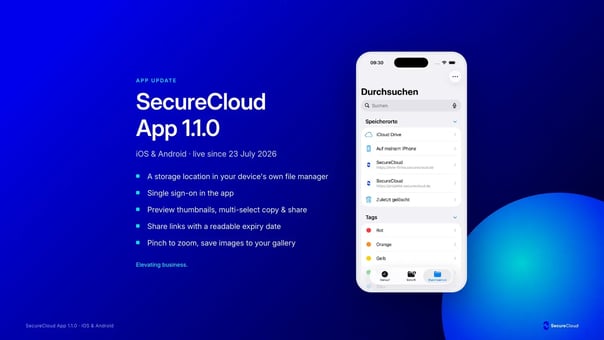
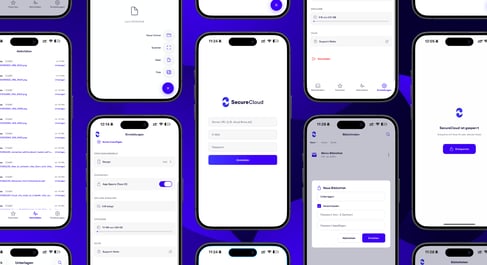
    Version 1.1.0 of the SecureCloud app has been live since July 23, 2026, for iOS and Android. The update focuses on three things you use every day: signing in, managing files, and managing photos. The biggest change is the integration with your device’s file manager. This makes SecureCloud a storage location that your device treats just like any other.

    A quick overview: the four sections
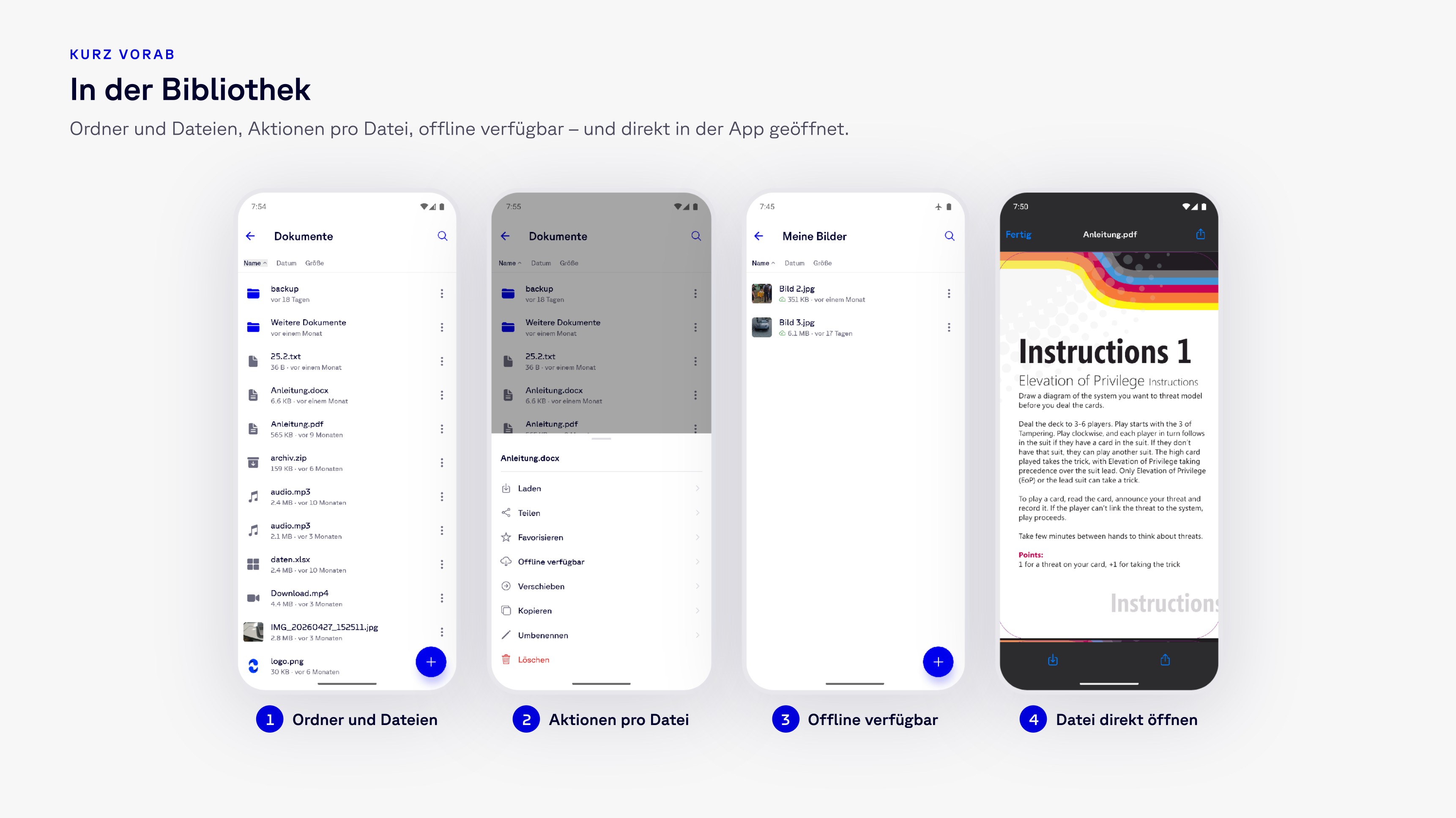
    Screenshot 2026-07-31 at 13.02.35

    Everything described below takes place in one of the four sections in the bottom bar: Libraries for folders and files, Favorites for everything you access regularly, Activity for changes, and Settings. In a library, you can see your folder structure, the actions available for each file, and which files are available offline—and you can open files directly within the app.

    The Core Feature: SecureCloud as a Storage Location on Your Device

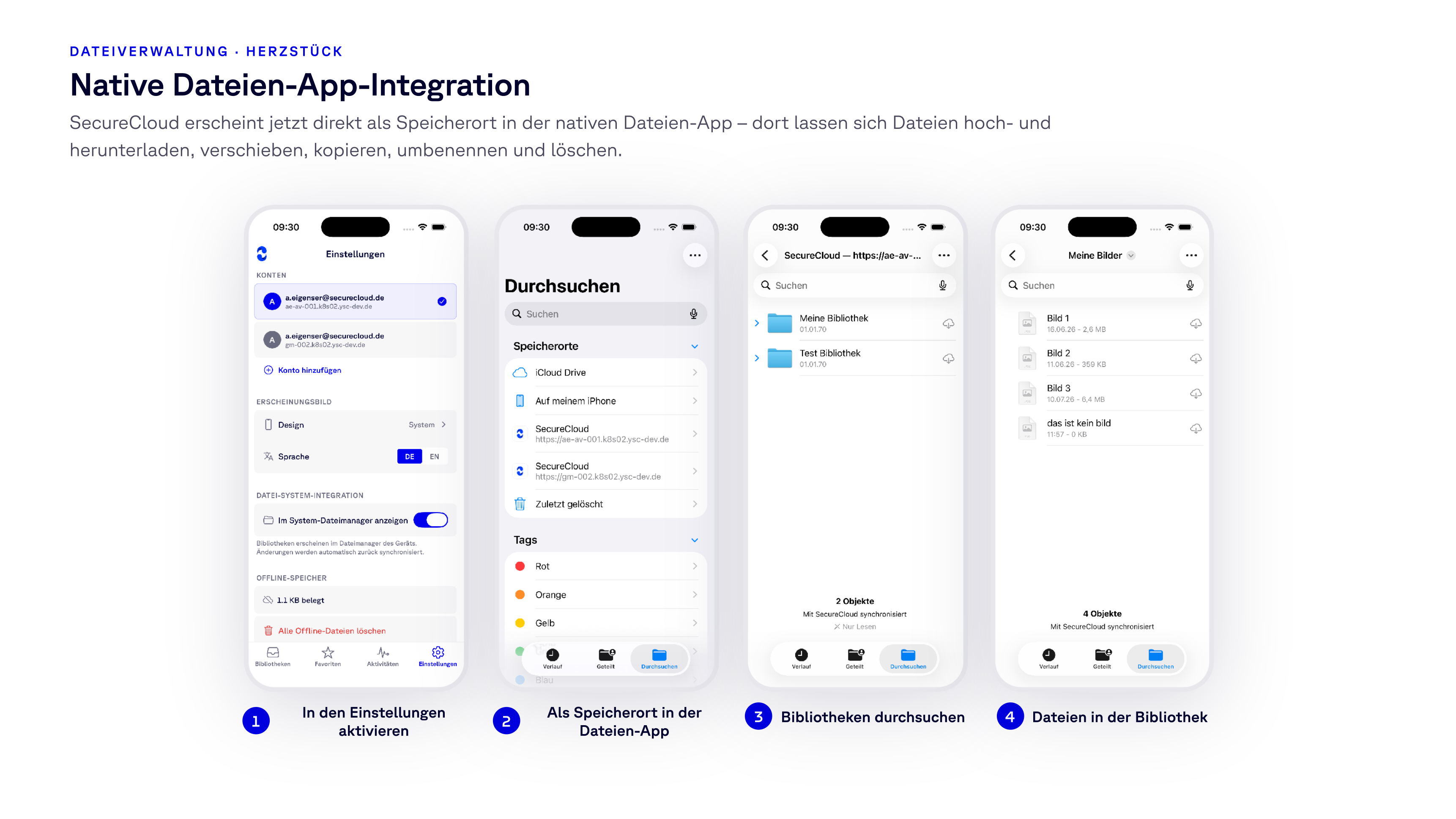
    Until now, the app was the only way to access your libraries when working on your smartphone or tablet. With version 1.1.0, simply enable the “Show in System File Manager” option in Settings once—and SecureCloud will appear as a storage location in your device’s file manager: on iOS, in the Files app next to iCloud Drive and local storage; on Android, in the system file manager.

    From there, SecureCloud behaves just like any other storage location:

    • Upload files to a library and download them from it
    • Move, copy, and rename
    • Delete
    • Search all libraries you have access to
    Screenshot 2026-07-31 at 13.06.44

    The practical result: SecureCloud is no longer a separate destination you have to access on its own. You can attach a contract to an email directly from the library, save a scan from the scanning app to the client folder, and drag a file into the application you’re already working in. No detours, no downloading-and-re-uploading, and no second copy left sitting in the Downloads folder. The app automatically syncs changes back.

    Single Sign-On Login

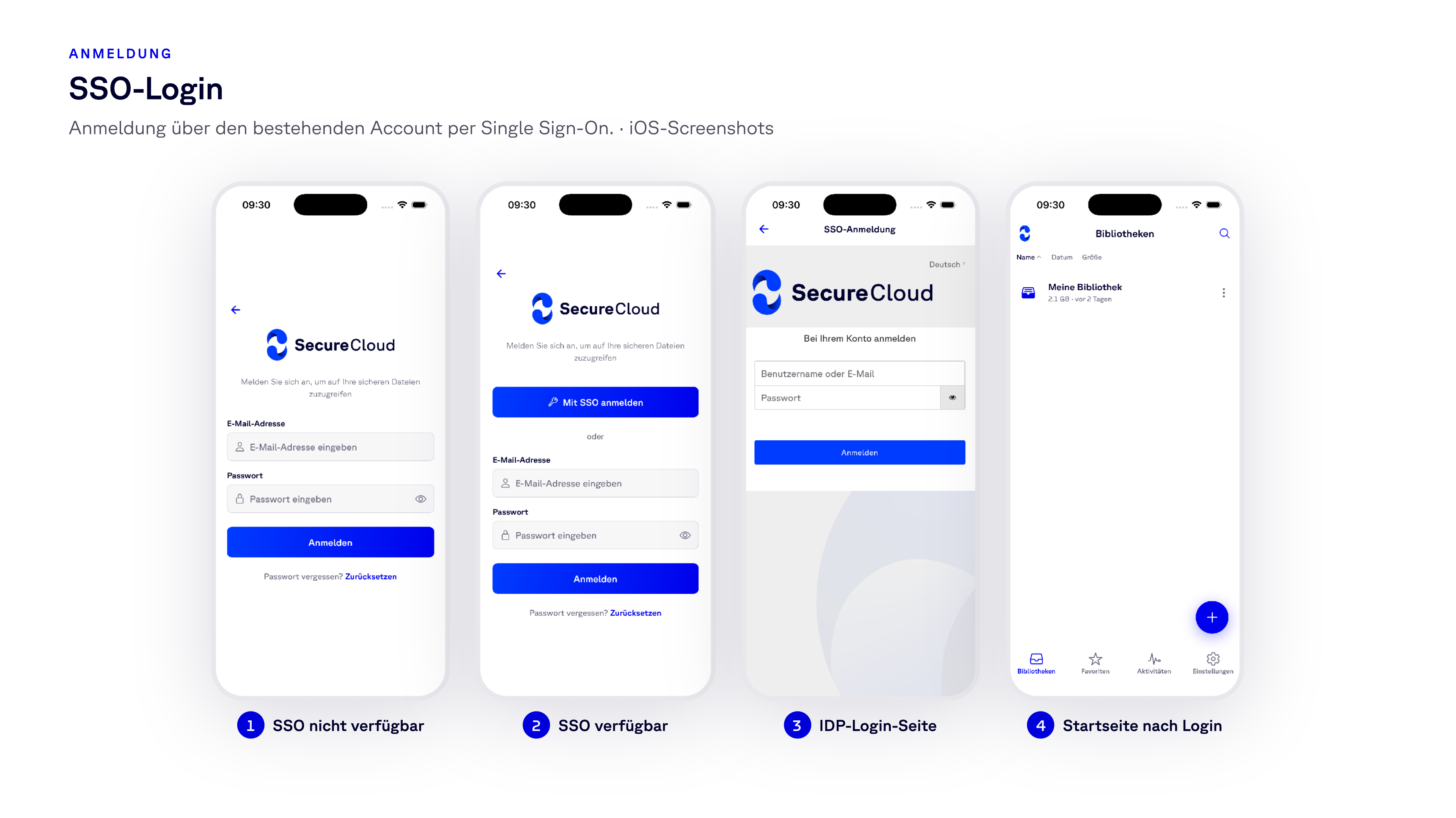
    If your organization uses Single Sign-On, the app now offers this option directly on the login screen. Above the usual fields for email address and password, the “Log in with SSO” button appears; the app redirects you to your identity provider’s login page, and after authentication, you’ll be taken directly to your libraries.
    Screenshot 2026-07-31 at 13.17.23

    Two details to note: The SSO button only appears for accounts where Single Sign-On is actually set up—no one ends up in a dead end. And you continue to use your existing account. There is no separate identity for mobile use.

    Everyday File Management

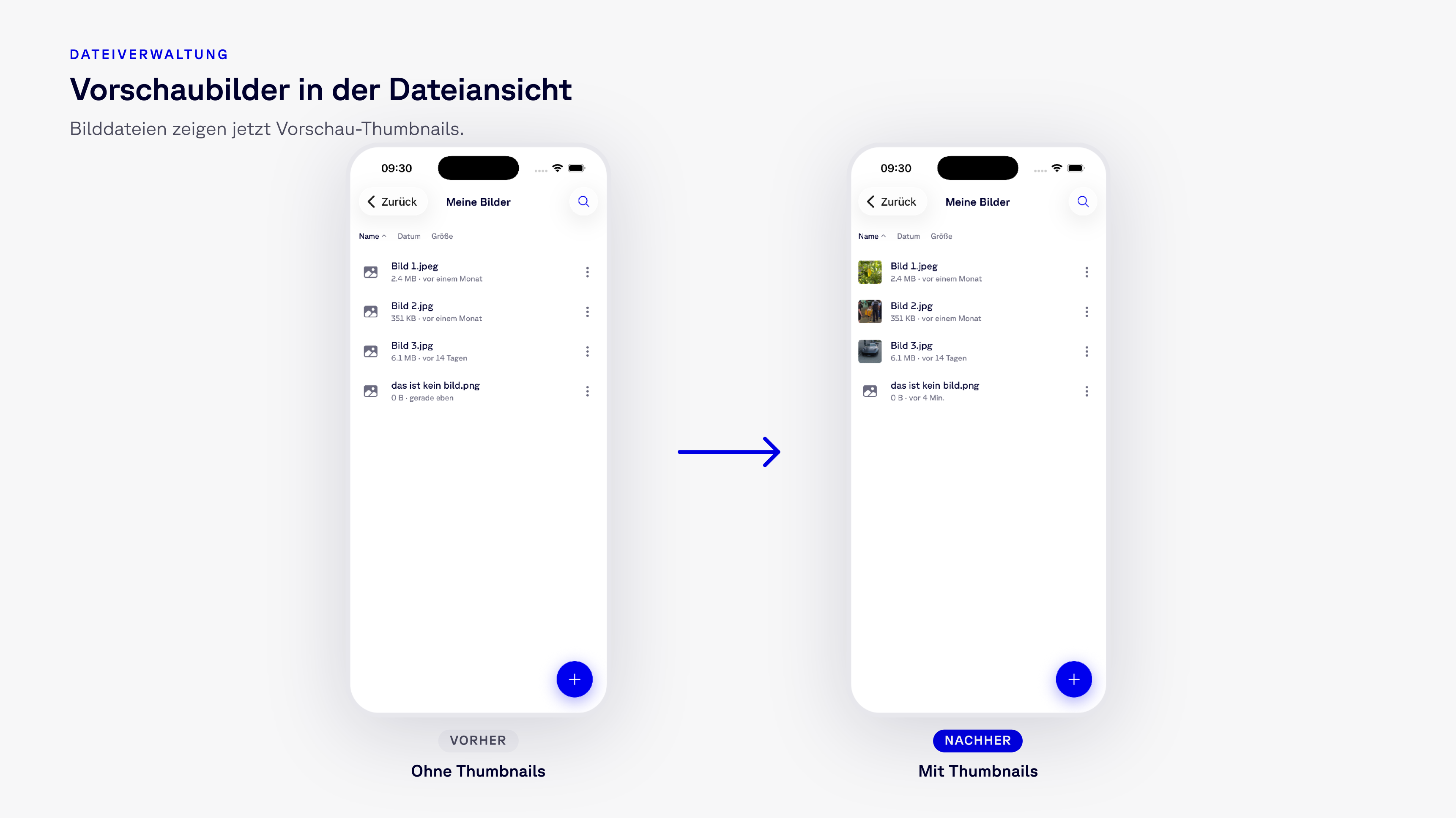
    Thumbnails in the File View
    Screenshot 2026-07-31 at 13.08.01

    Image files now display a preview thumbnail instead of a generic icon. It may sound like a cosmetic change, and it’s the one that stands out first: a folder containing scans, product photos, or screenshots is now easy to grasp at a glance, and you no longer have to open three files to find the right one.

    Selecting, Copying, and Sharing Multiple Files
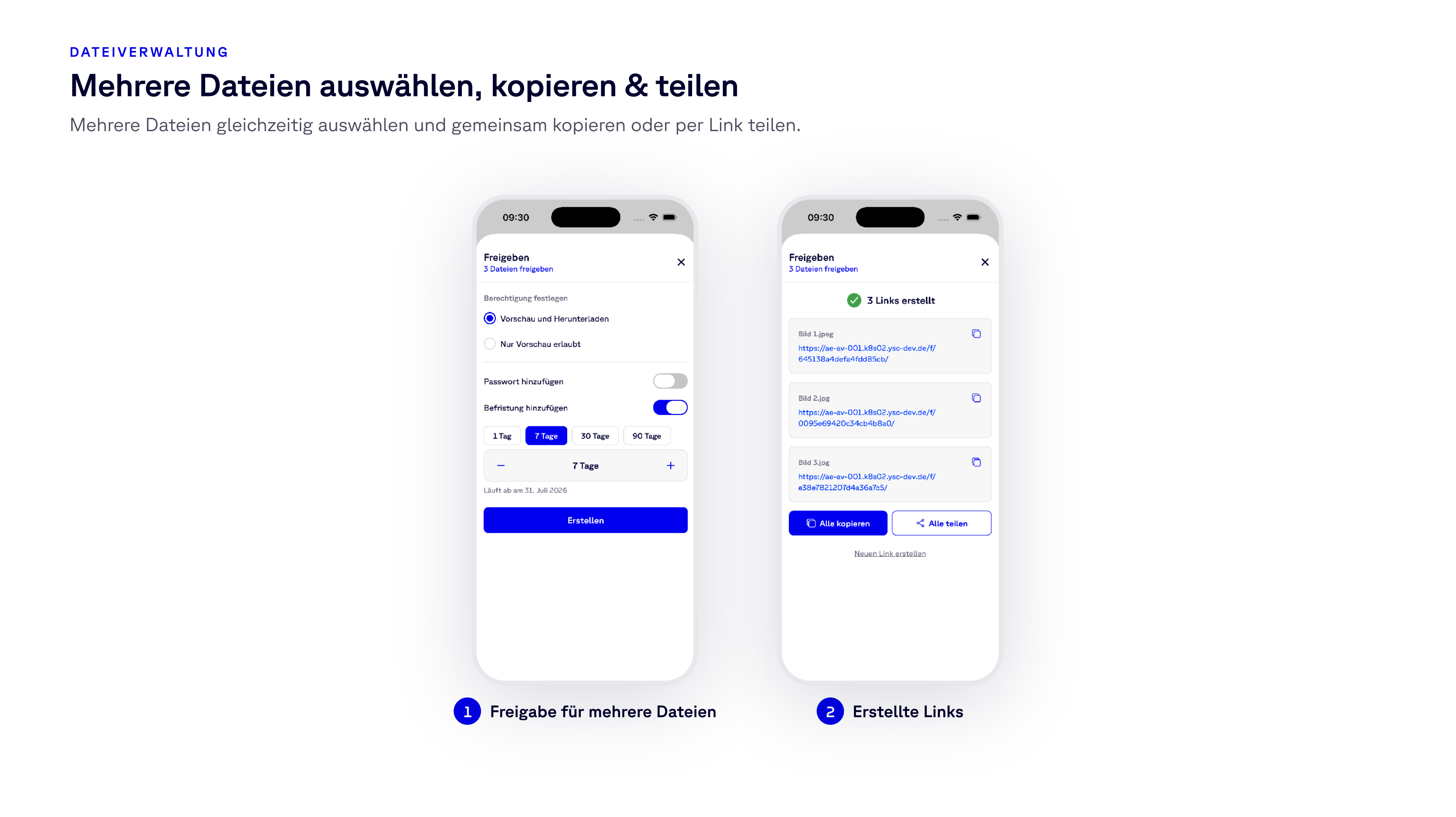
    Screenshot 2026-07-31 at 13.10.22

    Multiple selection has arrived in the file list. You can select multiple files and copy them to another folder in a single step—or share the entire selection as links in one go. The sharing dialog indicates that it’s processing a selection rather than a single file, and you’ll receive all the generated links at once. Sending five documents to clients is now a single step instead of five.

    An Expiration Period You Can Actually Read

    Share links have always had an expiration period. Until now, setting it meant typing a number into a field labeled “Days”—you had to do the math yourself. Now you can choose between 1, 7, 30, and 90 days, adjust the value as needed, and the dialog displays the expiration date below.
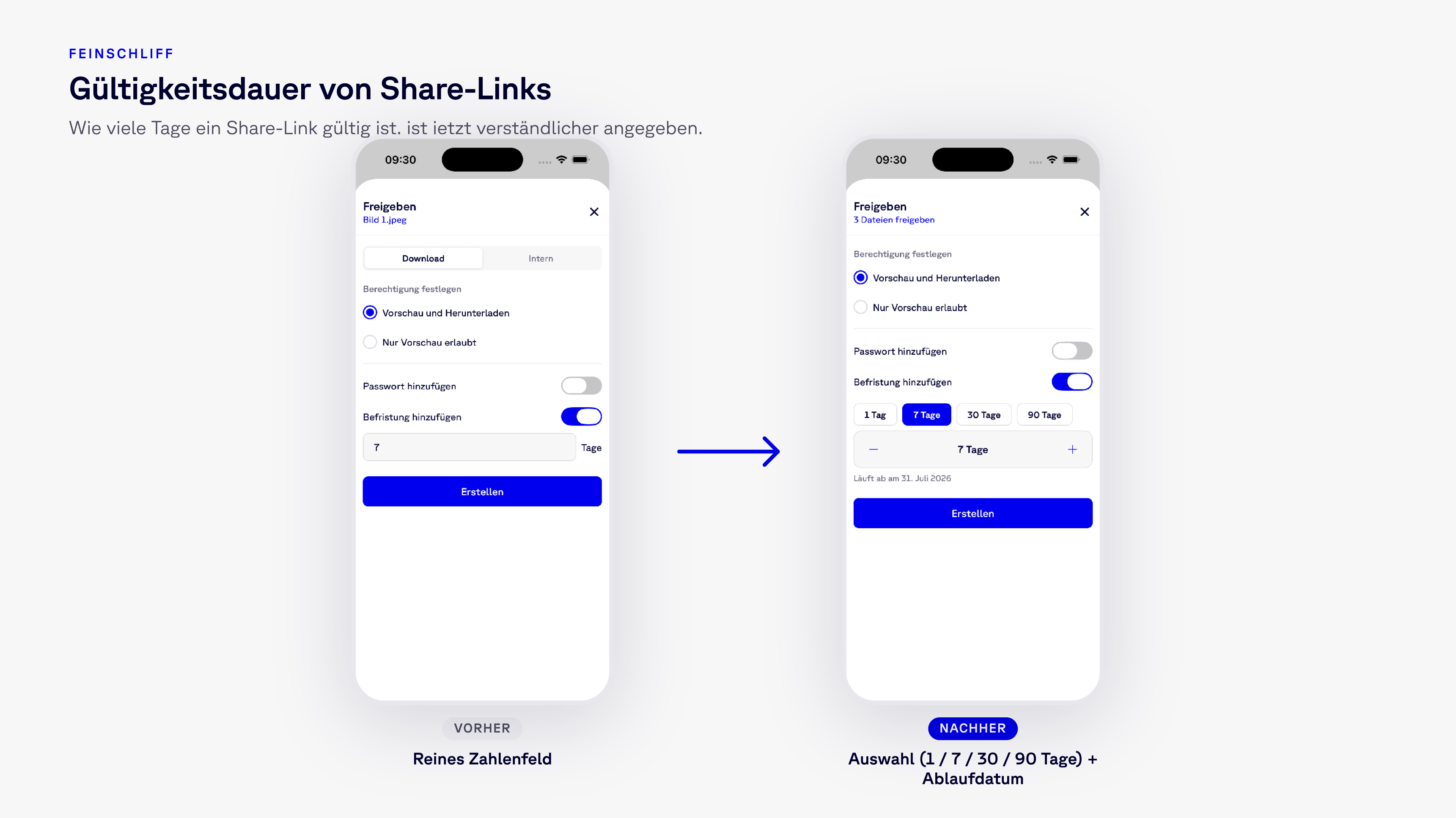
    Screenshot 2026-07-31 at 13.11.49

    The rest of the dialog remains the same: the choice between “Preview and Download” and “Preview Only,” as well as the optional password for the link.

    Images: Zoom and Save to Gallery
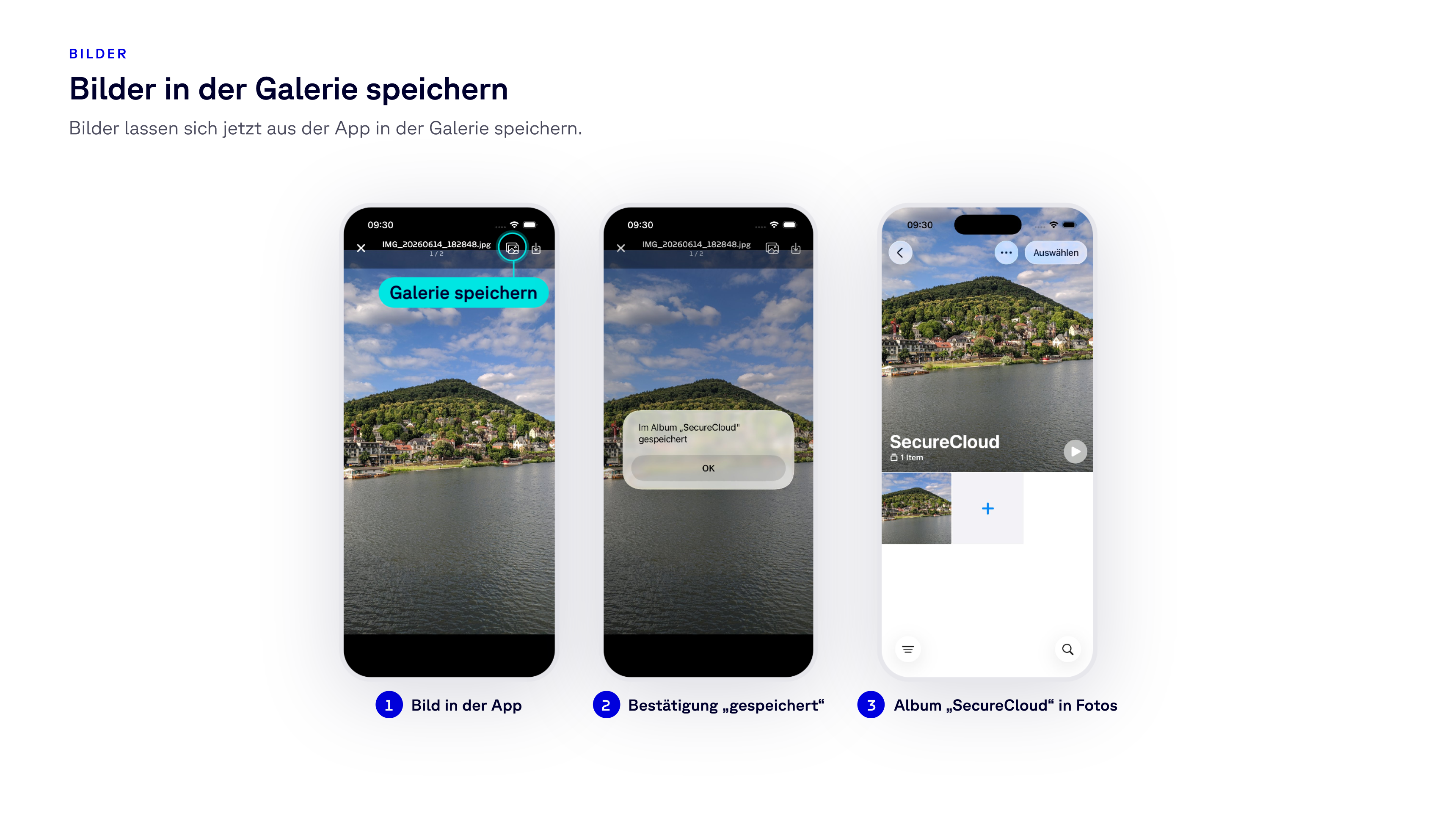
    Screenshot 2026-07-31 at 13.14.02

    Two changes for anyone who works with photos on the go rather than with documents at a desk:

    • Zoom using a pinch gesture. Images opened in the app can be zoomed in on using the familiar pinch gesture. This makes a serial number or a handwritten note on a delivery slip legible without having to export the file first.
    • Save to the gallery. Images can now be saved from the app to the device’s photo gallery. They are stored in a dedicated “SecureCloud” album, keeping them separate from your personal photos.

    Update Now

    Version 1.1.0 is available on the App Store and Google Play; links to both are on our download page. If automatic updates are enabled, you already have the update—and integration with the file manager is just a toggle away in Settings.

    If you have a request, suggestion, or feedback about the update, feel free to share it anytime. The list above was created based on what customers tell us about their experiences—and the next one will be too.

    Interessiert Sie die souveräne Cloud?

    Unsere Experten erklären Ihnen gerne mehr.

    Kostenlos testen
    Picture of SecureCloud

    SecureCloud

    SecureCloud is a German cloud platform for encrypted data rooms, secure data exchange, and digital signatures. Its headquarters and all data centers are located entirely in Germany. SecureCloud is ISO 27001-certified, holds a BSI C5 certificate, and complies with the requirements of the GDPR. Since 2014, SecureCloud has supported more than 6,000 customers in the private and public sectors, including critical sectors such as healthcare, the legal system, public administration, and the financial sector.

    Topic
    • Product Updates

    Subscribe to our Newsletter

    Recent Articles
    • Confidential files by email: who is liable, and for what
    • SecureCloud App 1.1.0: File Manager Integration, SSO, and Share Links
    • The Cyber Resilience Act (CRA) makes no exceptions—security is the key to entering the supply chain
    • AI Meets Cloud Storage: SecureCloud Launches MCP Server for Seamless AI Integration
    • The EU-US data protection framework following ‘Trump v Slaughter’

    Related Articles

    AI Meets Cloud...
    SecureWork

    AI Meets Cloud Storage: SecureCloud Launches MCP Server for Seamless AI Integration

    The SecureCloud MCP server connects AI assistants to file storage—voice-based file management, 1:1 permissions, and auditing. Hosted...

    Read more
    Secure cloud now...
    SecureWork

    Secure cloud now available for your smartphone: The SecureCloud app for iOS is here

    The new SecureCloud app for iPhone and iPad: manage files, scan documents, work offline - GDPR-compliant and with Face ID protection....

    Read more
    BSI C5 explained:...
    News & Trends

    BSI C5 explained: what the attestation covers and proves

    The BSI C5 catalogue produces an attestation, not a certification. What auditors check, what a C5 report proves about a provider, and...

    Read more
    SecureCloud logo
    Icon Phone
    +49 (0) 9181 - 27 308 - 0
    Icon Mail
    sales@securecloud.de
    • Home
      • Pricing
      • Trial version
      • Book a consultation
      • Login
    • Features
      • SecureCloud
      • SecureShare
      • SecureWork
      • SecureSign
    • Solutions
      • Marketing
      • IT
      • HR
      • Sales
    • Industries
      • Law & tax advice
      • Healthcare
      • Authorities
      • Financial sector
      • Manufacturing
    • Resources
      • About us
      • Blog
      • Webinars
      • Download
      • Contact
      • Help & Support
    Social LinkedIn
    Social Xing
    Social Instagram
    Social YouTube

    Copyright © 2026 SecureCloud GmbH
    • Legal notice
    • Data protection
    • Disclosure requirements
    • Trust Center
    • Terms
    • Cancel Account