





.png?width=432&height=358&name=Government%20(1).png)








.png?width=368&height=447&name=blog-icon%20(1).png)





The new year is just around the corner and SecureCloud users have every reason to look forward to it! Introducing: The new SecureCloud Outlook add-in is now available for all SecureCloud users! And that's just the beginning of a jam-packed 2025!
This further underlines our commitment to providing you with the best data protection and maximum security, combined with ease of use and time savings. With our add-in, nothing stands in the way of secure data exchange with external parties.
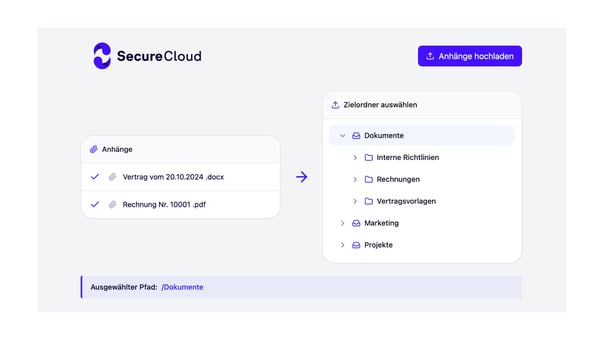
But first to the new Outlook add-in. This means that all SecureCloud users will soon be able to enjoy the following functions directly from Outlook without having to leave the application:
- Conveniently navigate through your files directly in Outlook,
- create share links from the add-in and attach them directly to your mail,
- upload files...
- ...and search for folders and files without switching programs.
.webp?width=470&height=320&name=675aa3c57b591b1924f8a3b7_675aa37f0136cc418d1ea9a5_Link-Konfiguration%202%20(1).webp)
The functions of the SecureCloud Outlook add-in
In future, you will find the button for the Outlook add-in for SecureCloud in the ribbon when reading or writing emails.
.webp?width=500&height=313&name=675a9fe9972c092860d95f45_675a9fb6cb011c6245f01a77_Einstellungen%20Add-In%20(1).webp)
With various view options, you can choose between all your files, favorites and recently used items directly from Outlook. The add-in is easy to use and can be accessed quickly. Attach secure links to your emails to share sensitive data faster than ever before. You can rename the files before uploading, set your preferred default destination folder for downloads and set automatic passwords and expiration dates.
.webp?width=500&height=333&name=675aa53d084353d4697923d5_675aa4b0b80d0b3a0e25206f_Open%20Sidebar%20(1).webp)
Authorization management directly from Outlook
In addition, there is the usual precise authorization management that SecureCloud users appreciate. Determine exactly which access rights the recipients of your shared links should have. You specify whether the recipient can only see a preview, download the file or, in the case of Office files (.pptx, .docx, .xlsx), also edit it.
For folders and libraries, you can allow or deny the upload.
Enjoy the security and familiar convenience of SecureCloud directly in Outlook.
Interessiert Sie die souveräne Cloud?
Unsere Experten erklären Ihnen gerne mehr.